
Release April 2025 - v7.15
Learn more about the v7.15 releases
- BDI performance improvement
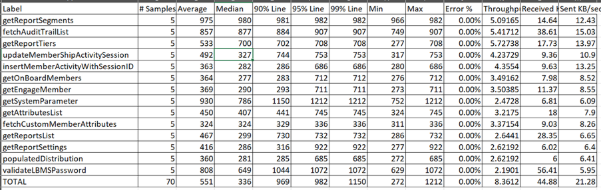
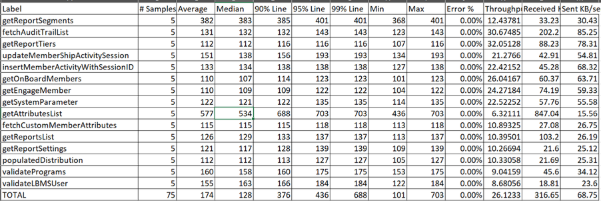
Many of the graphQL api's performances are improved TPS and response time of the API's are improved.
- TPS and Response time before the Fix with sample size 5
- TPS and Response time After the Fix with sample size 5
LBMS Performance Improvement - Documentation.docx
- Remove duplicate Tier tables for configuration & member mapping
- This is to reduce the unnecessary duplicate tables created for storing tier information in MSSQL and Postgres. Currently, Loyalty uses a single database (MSSQL), so the duplicate tables(tier_configuration and member_tier_mapping) at the company level are removed.
- With this removal, application does not have to update multiple tables which will reduce the overall burden.
- Now the member-tier mapping information will be present in partner_master and tier configuration information will be present in lbms_tier.
- Overall tier functionality remains same even with the above changes.
- Peer to Peer Point Transfer API
- User can now send points to members who are part of the same program using the Peer to Peer point transfer API
- Cross Program transfer is not supported.
- Member status apart from cancelled/closed can transfer/receive the points.
- The transactions are recorded in Reports and can be retrieved using with filter "Peer-to-Peer Transfers"
- Decimal Treatment of Points
- Now Redemption API accepts decimal values up to 5 decimal places
- Decimal values beyond 5 digits would be truncated
- Any decimal value would be rounded off to the next whole number, and the rounded-off value can be seen in reports under spoilage.
- When a transaction involving spoilage points is reversed(redemption reversal), the total points(including spoilage) deducted from member is returned back.
- Pushing automatic addition of points for an extra positive checkout without requiring a manual reclaim
- Auto claim works based on the claim setting configured in the Loyalife application.
- Member needs to claim at least once at the start for the system to identify which member needs to be mapped to which transaction.
- Once the transaction and member combination is identified, irrespective of transaction type(CR/DR), the future transactions would be auto claimed if same Member-Txn combination comes back.
- Auto claim will happen irrespective of the past transaction status. Either the transaction could be in claimed(claimed but not processed by computation engine) , pending(Points awarded by computation engine but in pending state) and ready to redeem(points awarded and ready to redeem).
- Auto claim of bulk txn(CR/DR) is verified
- Add New Events in Transaction Template Type
- Mail to trigger pending txn are triggered using the cron which is set for every 2 min. So the transaction should stay in status transaction_type=5(pending) for minimum 2 min for the mail to get triggered.
- Within the 2 minutes time, if the transaction gets confirmed(moved from pending to completed) then pending transaction mail would not be sent and only completed txn mail would be sent.
- Test Email is supported for the both pending and completed transaction
- If the template is disabled, then the mails would not go. If the template is enabled later, then only future triggered mails will be sent.
- The events pending and completed is tested for both primary and secondary email template
- Resend email works for pending and completed events.
- Pending and completed events work for member with status “Active“, “Suspended“ and “Blocked“.
- Cancelled/closed and Inactive members will not receive the mail.
- Enhanced Validation and Autofill for Username in User Creation Flow
- With this enhancement now with the input of email address, username would be auto populated if already exists in the system(present in some other program).
- If the Email id exists in the current program, then error message would be thrown indicating user to enter another email address.
- In case of update, user can enter new email address and with this action the earlier email address mapped to the user would be deleted.
- When editing a user's email address using the edit functionality, the updated user details will only be reflected on their profile after they log out and log back in.
- The same username cannot be used with a new email ID if it is already linked to another email ID.
- Users can be added again if they are archived or locked, with the username automatically fetched based on the email ID. The user will be removed from the archived folder and displayed on the User Management homepage. If the user was locked, their account will be unlocked.
- Standardize and Enhance "Add New Rule" Flow in Rule Engine
- This flow change is valid only for new/existing Program where rule engine is not setup. For existing program where rule engine is already configured, this enhancement will not have any relevance.
- Now when user clicks on rule engine setup the schema gets created at the backend and attributes need to be created after the schema creation.
- With this change user will not be able create a transaction attribute with mandatory constraint.
- Both Mandatory and Unique constraints are now not applicable for transaction attributes.
- Resolve Role Permission Count Discrepancy for Admin and Super Users
- New permission “Create program“ is introduced in the roles but user will not be able to select this permission.
- The user can view the permission count after creation of the role which includes the create program count.
- When user exports and imports program setting, the roles data shows the access count which were present in the exported program.
- Providing custom expiry for bonus points under Manual points, Campaigns, BNS File, Bonus API
- Users can pass the Expiry date in the Bonus API, BNS file, Manual points and campaign. In all the places the expiry date is a optional field.
- When the expiry date is passed in any of the above cases, this will override the program expiry configuration.
- If the expiry date is not mentioned in the request, then program expiry configuration will be considered.
- Expiry date passed in the request should be equal or greater that current date in case of Bonus request. For campaign it should be greater than campaign end date. it can be greater than program expiry date.
- If user issues negative points(BNS file and Bonus API), then expiry date is not considered.
- Expiry can be set for only reward type and not for promotional type campaigns.
- Providing Rule Engine Edit with versioning
- Users can edit rules which are not archived. Incase a archived rule has to be edited, then it first needs to be unarchived.
- All the rule engine edits are audited in the audit trail section.
- User can edit the rules for unlimited times. Each time a rule is edited, the version would be incremented. Latest version would be considered for the computation.
- User can view the history of rule edits and also download the summary.
- If maker checker is enabled, then rule edit has to undergo maker checker approval process.
- For the user to edit, he needs to have edit/create rule engine permission.
- If the settings are imported, then the version history will display value for "Created by" field as "NA"
Version ID is applicable only for Rule Engine downloads and not for reports.
- Enhancing Fail and Success Messages for Claim Transactions in Loyalife Member Portal
- Success and failure messages are enhanced on the loyalife storefront so that member gets proper information in case of below scenarios.
- When mandatory claim parameters are not passed.
- When invalid claim parameter values are passed.
- When a txn which is already claimed is passed by same/different member.
- When a txn which is claimed and points are in pending is again tried to claim
- When a txn which is claimed and points are confirmed(redeemable state) is again tried to claim
When a claim is successful
- Profile Editing Option
- Now user is can edit the profile(first name, last name and mobile number details).
- Mobile number unique check is maintained.
- Edited information is reflected in the partner master and also in the Loyalife member section.