
Technical Settings
Learn how to manage the Technical settings on Loyalife
Two settings can be enabled here:
- Allow Export of Member PI Data
- Enable Accounts and Card Linking to Members
Allow Export of Member PI Data
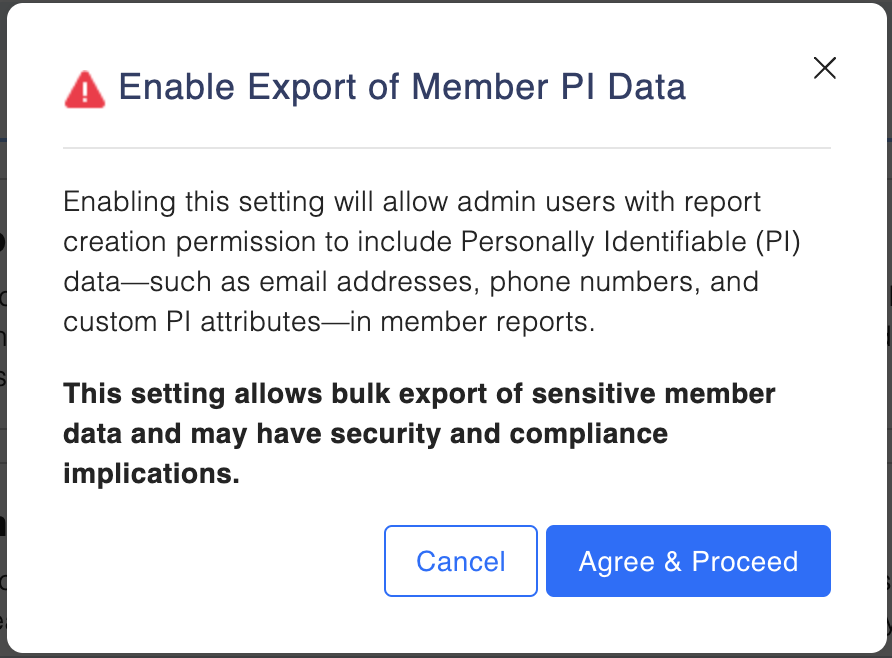
With this enabled, admin users with the appropriate report creation permission will be able to include PI attributes in member reports. The PI data exposure feature is primarily designed to expose PII information maintained in the member profile for reporting purposes. Toggle on or off as needed.
If toggle is on, users with appropriate report creation permission will be able to include the PI Attributes in the Member Reports.
Please note that enabling this feature allows bulk export of sensitive personal information, including email addresses, phone numbers, and any custom attributes marked as PI.
This article will walk you through the "Allow Export of Member PI Data".
What is CRD?
Customer Relational Data (CRD) refers to external account or card-level information linked to loyalty member profiles—such as:
- Credit card or EMI account numbers
- Sub-relationship types (e.g., Primary/Secondary)
- Account status
- Member's relation reference ID
While CRD is processed and stored in the backend, it was previously not configurable from the UI. With this release, CRD visibility is now manageable directly through platform settings.
How to Enable/Disable CRD
- Go to Advanced Configuration > Technical Settings.
- Locate Visibility Toggle.
- Switch the toggle ON/OFF as needed.
- A confirmation popup will appear:
- “Enabling CRD visibility will expose linked account and card data in the UI. Ensure PI permissions are correctly configured.”
- Click** "Agree & Proceed"** to save your choice.
Exporting CRD Reports
- Export is only available to users with permission of PI and create report.
- Export would contain the member relation reference, card number, sub relation identifier, type, and status. Naming convention as Cards and Account Export <User Name> <Date>.csv.
Permissions & Security
- All toggle changes are recorded in the Audit Log.
- Unauthorized access attempts are logged and blocked.
Please Note:
- Once the PI Data Toggle is enabled for a report, it becomes a one-way action and cannot be disabled afterward.
- If the toggle is OFF → users can enable it.
- Once enabled (ON), the toggle is locked and cannot be switched back to OFF.
Updated 7 months ago